DU Admit Card and Seat Plan 2026-27: How to Download
You can download your DU admit card (প্রবেশপত্র) for 2026-27 from 3:00 PM on December 2, 2026 for the IBA and Science units, and from 3:00 PM on December 7 for the other three. Each window closes one hour before that unit’s test, DU’s admission portal shows, and downloads happen only on that portal.
Item | 2026-27 detail |
|---|---|
Where to download | admission.eis.du.ac.bd, DU’s Central Admission Office portal |
IBA and Science admit cards | From December 2, 2026, 3:00 PM |
Arts, Law and Social Sciences; Fine Arts; Business Studies | From December 7, 2026, 3:00 PM |
Last moment to download | 1 hour before your test: 9:00 am on December 5 for IBA, 10:00 am on the test day for the other units |
What to bring | Admit card, original HSC registration card, black ballpoint pen |
DU Admit Card 2026-27 Download Dates by Unit
DU’s admission portal lists two admit card windows for 2026-27. IBA and Science candidates can download from 3:00 PM on December 2, 2026, and Arts, Fine Arts and Business Studies candidates from 3:00 PM on December 7. Each window closes one hour before that unit’s test starts.
| Unit (old search name) | Test date and time | Admit card from | Download closes |
|---|---|---|---|
| IBA | Saturday, December 5, 10:00 am–12:00 pm | December 2 | 9:00 am, December 5 |
| Science (A unit) | Saturday, December 12, 11:00 am–12:30 pm | December 2 | 10:00 am, December 12 |
| Arts, Law and Social Sciences (B unit) | Saturday, December 19, 11:00 am–12:30 pm | December 7 | 10:00 am, December 19 |
| Fine Arts | Tuesday, December 22, 11:00 am–12:30 pm | December 7 | 10:00 am, December 22 |
| Business Studies (C unit) | Saturday, December 26, 11:00 am–12:30 pm | December 7 | 10:00 am, December 26 |
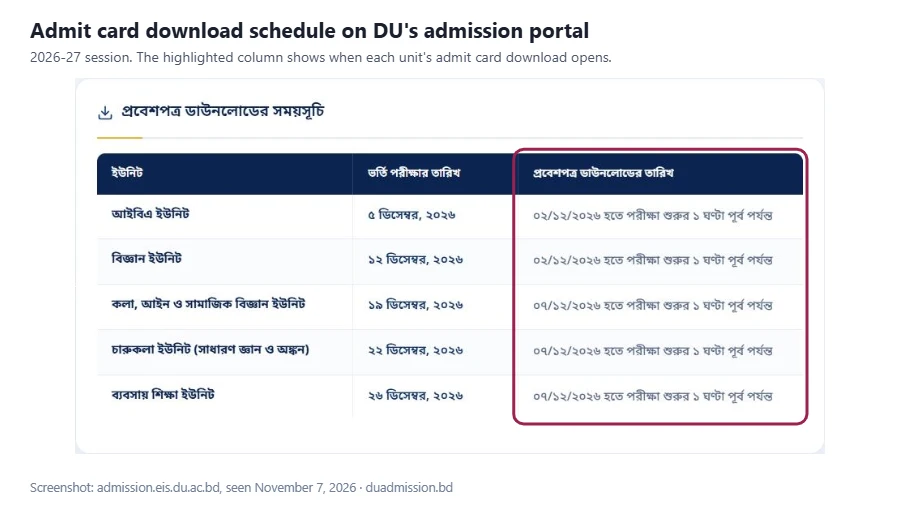
Every window opens at 3:00 PM on its first day, the portal shows. So your last chance for a DU admit card download is 9:00 am on December 5 for IBA, because its test starts at 10:00 am. For the other four units it is 10:00 am on the test day.
How to Download the DU Admit Card (ঢাবি প্রবেশপত্র ডাউনলোড)
To download your DU admit card, type admission.eis.du.ac.bd yourself, log in with the details you applied with, open your dashboard and click the admit card for each unit. The 2026-27 login uses your HSC roll, HSC board, HSC passing year and SSC roll.
These steps follow the official portal and DU’s application guideline of November 11, 2026. We will add the exact button names when downloads open on December 2.
- Type admission.eis.du.ac.bd in your browser’s address bar.
- Log in with your HSC roll, HSC board, HSC passing year and SSC roll, or your Equivalence ID for O and A Level.
- Enter the 7-character password you got by SMS when you registered; DU says you need it until you download the admit card.
- On your dashboard, find the admit card for each unit you applied to.
- Download the PDF and save it with your name and the unit in the file name.
- Repeat for every unit. Each unit’s admit card appears only inside its own window.
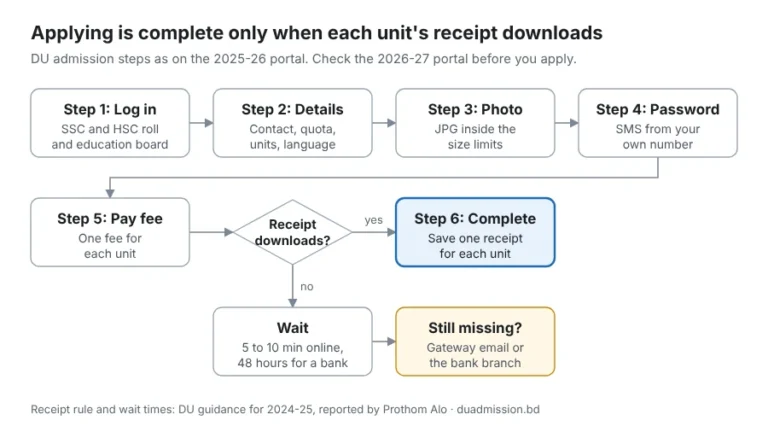
If you see no admit card for a unit, check that you have its fee receipt. DU said that an application stays incomplete until the fee receipt is downloaded. Our DU admission apply guide shows how to get it.
Check Your Admit Card Before You Print
Before you print, check that the name, photo, unit, test date and time on your admit card match your application. DU issues one admit card per unit, so a student who applied to two units downloads and checks two cards.
Check these on each card:
- Your name and photo
- The unit name
- The test date and time
- The test centre, if the card shows one
If anything is wrong, call DU’s Central Admission Office on 09666361991 before your test day. Don’t edit the PDF yourself.
How to Print the DU Admit Card
Print each DU admit card on clean A4 paper so the photo and text are sharp, and follow the print instruction written on the card itself. Print two copies, keep them flat in a folder, and keep the PDF saved until your test is over.
- Use A4 paper and a printer that keeps the photo clear.
- Follow any print rule on the card, such as colour or black and white.
- Print two copies, so one stays at home as a spare.
- Keep the PDF on a phone or computer at home until your test is over.
Some websites say only colour prints are accepted, and others say black and white is fine. We found no DU notice on this, so the instruction on your own card is the one to follow.
DU Seat Plan: Find Your Exam Centre and Room (ঢাবি সিট প্ল্যান)
The DU seat plan (আসন বিন্যাস) tells you your exam centre, building and room. For 2026-27, the Science and IBA guidelines say the detailed seat plan appears on the portal 48 hours before the test, and you can also get your seat by SMS as your admit card explains. Check it by logging in, not on social media.
- Log in at admission.eis.du.ac.bd.
- Open the unit whose test comes next.
- Note your centre and room, then plan your route.
The Science and Arts tests run in Dhaka and seven other centres, DU’s November 5 notice says. See the full list in our DU admission circular guide. The Business Studies guideline of November 11, 2026 lists five university centres for its test, and the Fine Arts and IBA tests take place only in Dhaka.
In 2025-26, after it moved the Science test, DU let some candidates ask for a centre change on the portal. They had another university’s test outside Dhaka on the same days. If your tests clash this year, watch the portal for a similar notice.
Exam-Day Checklist for the DU Admission Test
On test day, carry your printed admit card, your original HSC registration card and a black ballpoint pen. For 2026-27, the unit guidelines ban calculators, mobile phones, smart watches, smart pens, Bluetooth and any other electronic device, and ask you to be in your seat 30 minutes before the start. Last year’s admit card also banned pencils and asked candidates to come an hour early.
Bring
- Your printed admit card
- The original of your HSC registration card
- A black ballpoint pen
Leave at home
- Pencils of any kind (Fine Arts candidates bring their own pencil, eraser, pen and clipboard for the drawing test)
- Calculators and watches
- Mobile phones, Bluetooth devices and anything that can send a message
DU said it would cancel the test of any candidate found with such a device in the hall. For 2026-27, the gate closes at 10:30 am for the Arts and Business Studies tests and at 9:30 am for IBA; Science and Fine Arts candidates must be seated by 10:30 am.
The night before
- Check the portal for any change of date or time.
- Check your seat in your dashboard.
- Plan your route and leave early.
Worked Example: Two Units, Two Admit Cards
A science-group student who applied to the Science and Business Studies units downloads two separate admit cards. The Science card opens on December 2 and closes at 10:00 am on December 12; the Business Studies card opens on December 7.
This example student is not a real person. The dates come from DU’s admission portal.
| Date | What the student does |
|---|---|
| November 11–25 | Applies to Science and Business Studies; pays two fees, keeps two receipts and the SMS password |
| Wednesday, December 2 | Science admit card opens: downloads, checks and prints it |
| Monday, December 7 | Business Studies admit card opens: downloads, checks and prints it |
| Before each test | Logs in to see the seat for that unit |
| Saturday, December 12 | Science download closes at 10:00 am; test 11:00 am–12:30 pm |
| Saturday, December 26 | Business Studies download closes at 10:00 am; test 11:00 am–12:30 pm |
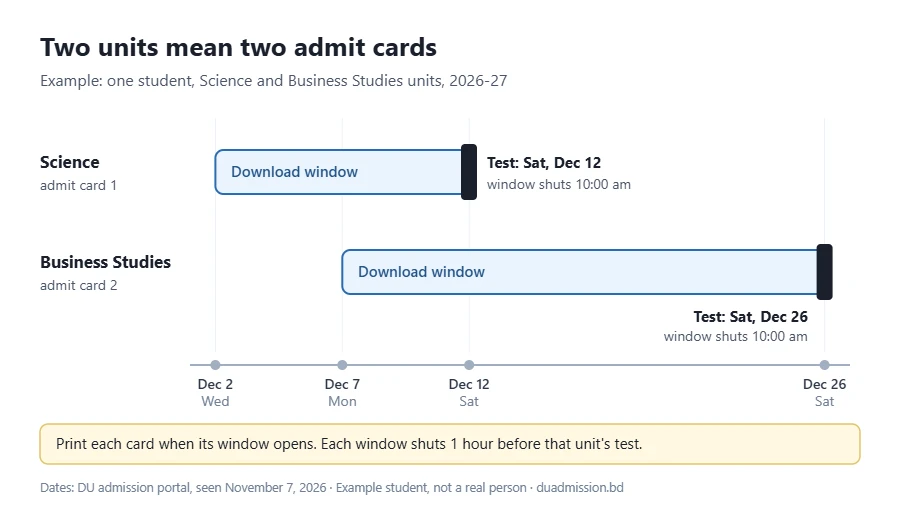
The two tests are 14 days apart, so the student never needs both cards on the same day. Each card goes to its own test only.
DU Admit Card Problems and Fixes
Most admit card problems come from a lost password, a login typo, an application that never got its fee receipt, or a busy portal near the deadline. The table below gives the likely cause and the fix for each, with its source.
Problem | Likely cause | Fix |
|---|---|---|
Lost the SMS password | A deleted message or a changed phone | Check the SMS on the phone you applied with; use the portal’s password option if it shows one; otherwise call 09666361991 |
Login rejects your roll or board | A typo or the wrong board | Copy them from your marksheet; see the login fixes in our apply guide |
No admit card for a unit | That unit’s window is not open yet, or the application never got its fee receipt | Check the dates table; check you have a receipt for that unit; then call the office |
Wrong name, photo or unit on the card | An error in your application data | Call the Central Admission Office before the test; don’t edit the PDF |
Portal slow near the cut-off | DU has not published a cause | Download early in your window, not on the morning of the test |
Your DU test clashes with another university’s test | Two schedules on one day | Watch the portal; in 2025-26 DU took centre-change requests there |
An “admit card” or “seat plan” link on Facebook or by message | Not from DU | Type the portal address yourself; in 2024-25 DU said it does not share admission news on social media |
If nothing works, call the Central Admission Office on 09666361991. The portal lists the office in Room 214 of DU’s Administrative Building.
After the Test: What Comes Next
After each test, keep your admit card safe and watch the official portal for your unit’s result. The 2026-27 guidelines say the Science Unit publishes its result within four weeks of its test, and the Business Studies and IBA units within 30 working days.
- See every step of the 2026-27 process in our DU admission 2026-27 guide.
- Check test dates, centres and marks in the DU admission circular guide.
- Watch admission.eis.du.ac.bd for your result.
DU Admit Card FAQ
Can I download my admit card after the window closes?
DU’s rule ends downloads one hour before your test starts, the admission portal shows. Download it on the first day your window opens, so you have time to fix any problem.
Do I need a separate admit card for each unit?
Yes. Each unit has its own download window and its own test, so download a card for every unit you applied to.
Can a parent download it for me?
A parent can help, as long as you use your own login and keep the password private. In 2024-25 DU advised that the student or a parent apply with their own phone, not a shop’s or a friend’s.
Is the IBA admit card on the same portal?
Yes. DU’s admission portal lists IBA in its admit card schedule, with downloads from December 2, 2026; IBA’s other rules are on IBA’s website.
I lost my printed admit card. What can I do?
Before the download closes, log in and print it again. After that, call the Central Admission Office on 09666361991, because we found no DU rule for this case.
Will DU send my seat plan by SMS?
Yes, for the Science and IBA units: their 2026-27 guidelines say you can get your seat by SMS, as your admit card explains, and the seat plan appears on the portal 48 hours before the test. Check your dashboard first.